 ApexPlayer
Own your Feed
You already run the server. This is the client that acts like it.
ApexPlayer streams from ApexFeeder, Plex, Jellyfin and Emby — the servers you own, on the hardware you bought, over the network you control. No account. No backend. Nothing phoning home.

Self-hosting is a decision about control
Nobody sets up a media server by accident. You did it so your library answers to you — not to a catalogue that rotates, a subscription that lapses, or an app that treats your viewing habits as inventory. Most clients forget that the moment you sign in. ApexPlayer is built the other way round.
Your server is the source of truth
ApexPlayer has no library of its own and nothing to sync you into. It reads what your server says, writes progress and watched state straight back, and stays out of the way. Cancel the app tomorrow and your library is exactly where it was.
No account, because there is no backend
There is nothing to sign up for. You authenticate to hardware you own, and those credentials go into the device Keychain — not to us, because there is no us to send them to.
Every automatic decision is overridable
ApexPlayer detects what your hardware decodes and picks tracks for you, then lets you override all of it: codecs, HDR, audio channels, bitrate ceiling, subtitle timing, which layout you look at. Sensible defaults, never locked doors.
Nothing phones home
No analytics, no telemetry, no crash service. The diagnostics toggle writes to the device log and stops there — it is opt-in, and even switched on nothing leaves your device. The only servers ApexPlayer talks to are yours, plus Plex or OpenSubtitles when you specifically ask it to.
Bring your own. Or use ours.
ApexPlayer works with whatever you already run. And if you'd rather not run someone else's server at all, ApexFeeder is ours — free, and pointed straight at your folders.
ApexFeeder
Free, and ours. Serves straight from your folders — local drives and cloud accounts alike.
Plex
Sign in with a link code — no password typed on the TV
Jellyfin
Username and password, or auto-discovered on your network
Emby
Same discovery protocol, same one-screen setup
ApexPlayer connects to servers you run. It does not host, index or provide any content of its own.
ApexFeeder serves folders, not a library you have to build
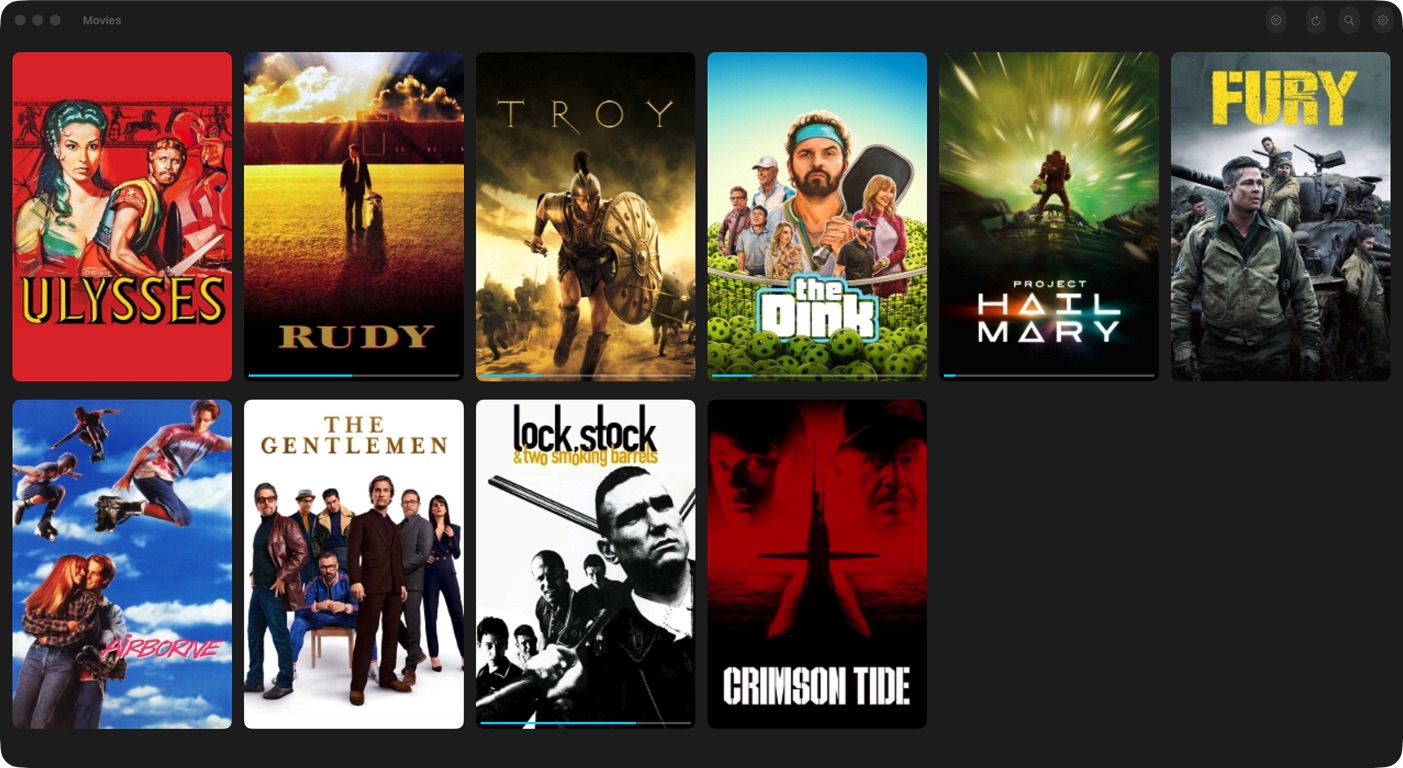
Plex and Jellyfin want you to curate a library. ApexFeeder just wants to know where your files are. Point it at a folder on your machine, or connect a cloud account, and it scans what it finds, fetches the artwork and metadata, and serves the lot to ApexPlayer as one catalogue.
Local folders
Drives and shares on the machine it runs on
Dropbox
Connect the account, keep the files where they are
OneDrive
Same — no downloading, no duplicating
Google Drive
Same again, merged into the same library
Connect your folders
Add a folder on the machine, or link a Dropbox, OneDrive or Google Drive account. Mix as many as you like.
It scrapes everything
ApexFeeder scans what it finds and pulls down artwork, descriptions, cast and episode data for every movie and series.
One library on your TV
Local files and cloud files arrive in ApexPlayer as a single catalogue. Nothing tells you which is which, because it stops mattering.
Movies/
    Pulp Fiction (1994).mkv
    The.Matrix.1999.1080p.BluRay.x264-GROUP.mkv

TV/
    The Wire/
        Season 01/
            S01E03.mkv
Predictable names are what let the scraper find the right artwork. Anything it can't match still shows up — just without a poster until you rename it.
ApexFeeder never transcodes — which is your job to plan for
Every play is a direct stream. That keeps ApexFeeder fast and simple, and it means the file has to be in a format your Apple TV, iPhone, iPad, Mac or Vision Pro can decode natively. An exotic codec that a transcoding server would have quietly converted will simply not play here. Keeping your files in Apple-friendly formats is the whole maintenance burden.
Setup is the boring part. So we shortened it.
Point it at your server
ApexPlayer scans your network and lists what answers — ApexFeeder, Plex, Jellyfin, Emby. Pick yours, or type the address. Connect as many as you want.
Authenticate on your terms
Plex hands you a link code. ApexFeeder shows a four-digit code that only gets approved on the machine it runs on. Nothing you type leaves your network except to your own server.
Watch, and stay in charge
Your library caches locally and opens instantly. Everything ApexPlayer decides for you — codecs, tracks, bitrate, layout — you can decide differently.
Subtitles a second late? Nudge them.
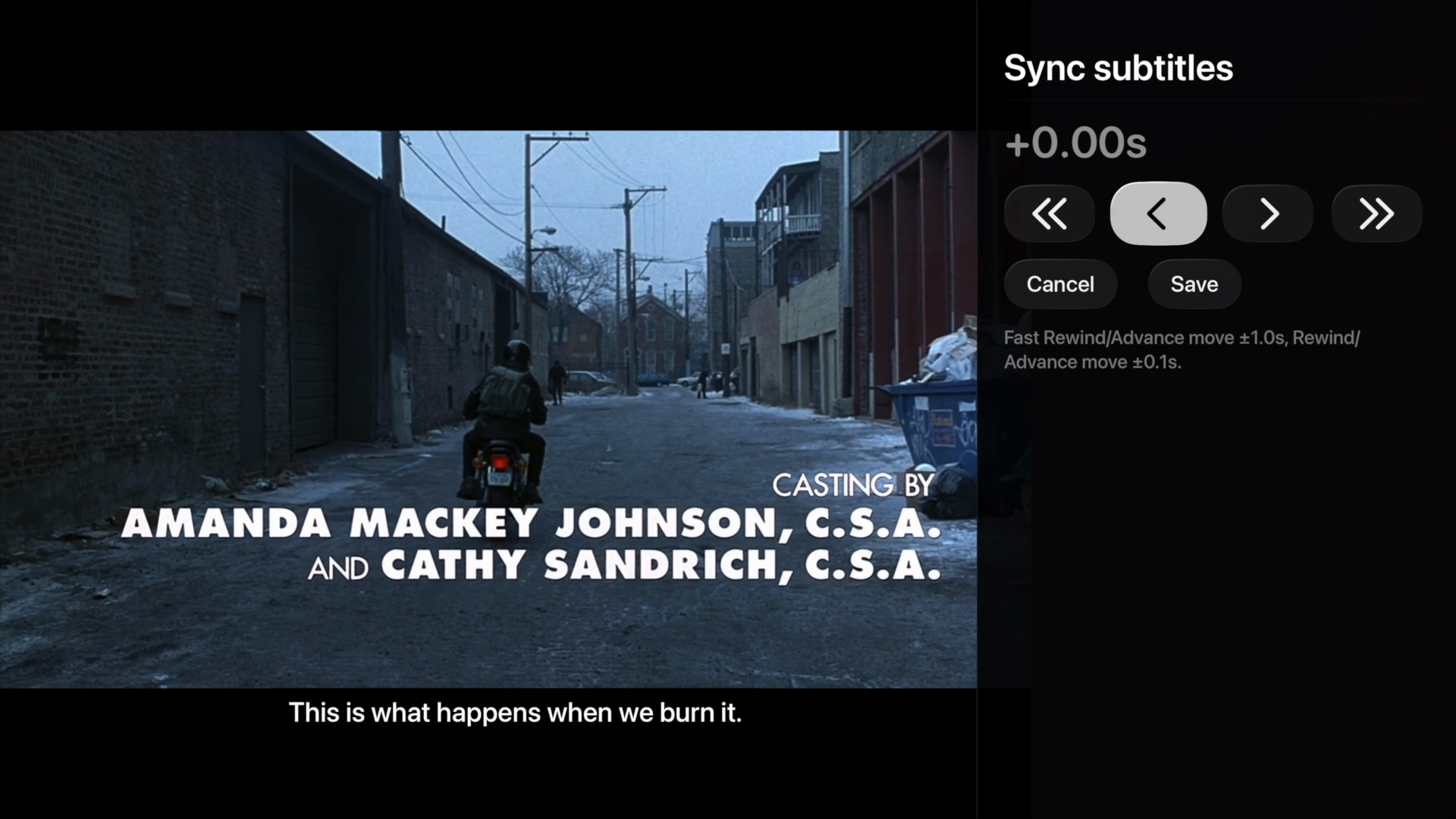
Most players hand subtitles to the system and leave you stuck with whatever timing the file shipped with. ApexPlayer draws them itself, so they can move. The video keeps playing beside the sync tool while you shift the track — coarse jumps to get close, fine steps to land it — and the overlay updates live, so you align by eye instead of by arithmetic.
- 0.1-second fine steps, 1-second jumps
- Video keeps playing while you adjust
- Save keeps the offset, Cancel puts it back
Built by someone who got tired of the alternatives
Every one of these exists because the thing it fixes was annoying enough to sit down and solve properly.
Four servers, one client
ApexFeeder, Plex, Jellyfin, Emby
Point ApexPlayer at whatever you already run. Plex signs in with a link code so no password gets typed on a remote, Jellyfin and Emby take ordinary credentials, and ApexFeeder — our own server — pairs with a four-digit code. Add as many as you like and they merge: one library, everything in it, no switching between them.
ApexFeeder serves folders, not a library you have to build
Free, and ours
Point ApexFeeder at folders — a drive on your machine, your Dropbox, your OneDrive, your Google Drive — and it takes it from there. It scans what it finds, fetches artwork and metadata for every movie and episode, and serves the whole thing to ApexPlayer as one library. No media manager to configure, no import step, nothing to move.
Cloud and local, finally in one library
Dropbox, OneDrive, Google Drive
The films on your NAS and the ones sitting in cloud storage stop being two separate piles you browse separately. ApexFeeder merges them into a single catalogue with one set of artwork, one set of metadata and one place to search — and ApexPlayer just sees a library.
Finds your server on its own
No IP addresses typed with a remote
ApexPlayer broadcasts on your local network and listens for what answers — Jellyfin and Emby on 7359, Plex over GDM, ApexFeeder on 27359. Servers that reply show up in a list you pick from. If yours lives somewhere unusual, you can still type the address by hand.
Knows what your hardware can decode
Fewer needless transcodes
Instead of sending one hardcoded profile to your server, ApexPlayer measures the device it is running on: hardware HEVC and AV1 decode through VideoToolbox, the real channel count of your audio route, and Dolby Vision / HDR10 eligibility. Your server gets the truth, so it direct plays instead of burning CPU on a transcode nobody asked for.
Subtitles you can actually fix
Nudge them while the film keeps playing
ApexPlayer draws subtitles itself rather than handing them to the system player, which means the timing is adjustable. Open the sync tool and the video keeps running beside it while you shift the track in 0.1-second fine steps or 1-second jumps — you align by eye, then save.
See where you are scrubbing
Thumbnail previews on the scrub bar
Hold the scrub bar and a preview frame follows your position, so finding the scene you actually wanted takes one pass instead of three. Reads Jellyfin trickplay data today, with Plex support as a fast-follow; servers without preview data simply scrub as normal.
Missing a subtitle track? Search from the player
OpenSubtitles, built in
Find Subtitles searches OpenSubtitles for what you are watching and loads the track into the current session. Works out of the box with no setup. Sign in with your own OpenSubtitles account and you get your own download quota rather than the shared one.
Three ways to look at a title
Modern, Minimal, Premium
Detail screens come in three layouts: a collapsing cinematic hero, a stripped-back minimal view, and Premium — a fixed hero with cast and related shelves scrolling independently below it. Pick the one you like and every movie and series follows it.
Built native where it counts
Focus that keeps up with the remote
The library grid, the shelves and the detail screens are native UIKit rather than SwiftUI, because a ten-foot interface lives or dies on focus feeling instant. Posters zoom cleanly, scrolling holds up on a full library, and nothing stutters when you hold a direction down.
Keeps your place, then keeps going
Resume, progress, autoplay
Playback position reports back to your server as you watch, so Resume works from any client, not just this one. Favorites and watched state write back too. When an episode genuinely finishes the next one starts — a pause is never mistaken for an ending.
Buy it once. That's the whole model.
There's no server on our end, so there's no monthly cost to pass on to you. The free version is a real player — Pro lifts the cap on how much of your library it keeps.
Free
Everything works. Just less of it at once.
- Your 10 most recent movies and 1 most recent series
- Every playback feature Direct play, transcoding, HDR, surround, scrub previews — all of it
- All four server types ApexFeeder, Plex, Jellyfin and Emby
- As many servers as you want No connected-server limit, ever
- Subtitle sync and search Including OpenSubtitles downloads
- Favorites and watched state Written back to your server as normal
ApexPlayer Pro
Bought once, yours for good. Family Sharing included.
- Unlimited cached library No cap on movies or series
- Subtitle customization Size, color, background and position
- Everything in Free Obviously
Bought inside the app, through the App Store.
The ones people ask first
Does ApexPlayer come with anything to watch?
No. It is a client, not a service. ApexPlayer plays what is on a server you run — ApexFeeder, Plex, Jellyfin or Emby. It does not host, index, provide or help you find any content.
What is ApexFeeder, and do I need it?
ApexFeeder is our own media server, and it is free. Unlike Plex or Jellyfin it does not ask you to build a library — you connect folders and it serves them. Those folders can be on the machine it runs on, or in Dropbox, OneDrive or Google Drive, and it merges all of them into one catalogue with artwork and metadata it fetches itself. It is entirely optional; ApexPlayer works the same against Plex, Jellyfin or Emby.
Does ApexFeeder cost anything?
No. ApexFeeder is free. ApexPlayer Pro is a separate, optional one-time purchase that affects the app, not the server.
Can ApexFeeder really play things straight out of my Dropbox?
Yes — connect the account and the files in it become part of your library alongside anything on local drives. You do not download or duplicate anything to make that work, and in ApexPlayer there is no distinction between a film stored locally and one stored in the cloud.
How should I name my files for ApexFeeder?
Movies go straight into a movies folder named after the film, like /Movies/Arrival.mkv. TV goes in a folder per show, with episodes named by season and episode number, like /TVShows/Severance/01_02.mkv. That is what the metadata scraper matches against — files it cannot match still show up, just without artwork until the name is corrected.

Own your Feed
It's out. Go and get it.
ApexPlayer is on the App Store for Apple TV, iPhone, iPad, Mac and Vision Pro. Discord is where updates get announced, bugs get reported, and feature arguments get settled.
